mirror of
https://github.com/rtic-rs/rtic.git
synced 2025-12-16 21:05:35 +01:00
| .. | ||
| .cargo | ||
| src | ||
| build.rs | ||
| Cargo.lock | ||
| Cargo.toml | ||
| memory.x | ||
| README.md | ||

STM32F411CEU6 encoder polling and LCD display
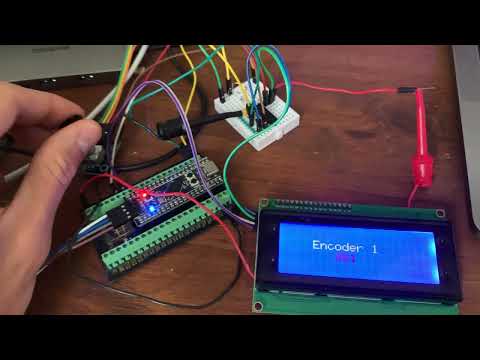
This example uses an STM32F411CEU6 microcontroller on the Blackpill board to interface with an I2C LCD display and a rotary encoder.
Features
- Rotary Encoder Integration: Reads input from a rotary encoder to adjust a value.
- I2C LCD Display: Displays the current encoder value on an I2C-connected HD44780 LCD.
Working principle
The hardware task tim2_timeout_interrupt_handler polls the encoder state on each interrupt generated by TIM2, and updates the displayed value accordingly.
Code Overview
Key Components
- Knob Struct: Placeholder for the rotary encoder and its current value.
- LCD I2C Communication: Uses I2C protocol to communicate with the HD44780 LCD.
- Timers: Utilizes TIM1 for delays and TIM2 for polling the rotary encoder.
Important Constants
LCD_I2C_ADDRESS: The I2C address of the LCD display.
Initialization
- System Clock: Configured to use an external 25 MHz clock.
- GPIO Setup: Configures GPIO pins for the LED, rotary encoder, and I2C communication.
- I2C Initialization: Sets up the I2C bus for LCD communication.
- LCD Initialization: Initializes the LCD and displays initial messages.
- Timer Setup: Configures TIM2 at 2 kHz and generate interrupts.
Tasks and Handlers
- idle: Background task that runs when no other tasks are active.
- tim2_timeout_interrupt_handler: Handles interrupts generated by TIM2, updates the rotary encoder value, and displays the value on the LCD.
Utility Functions
u8_to_str(n: u8) -> [u8; 3]: Converts an 8-bit integer to a 3-character string representation.
Dependencies
- hd44780-driver: Driver for HD44780 LCD over I2C.
- rotary_encoder_embedded: Library for handling rotary encoders.
- defmt: Logging framework for embedded systems.
How-to
Build
Run cargo build --release to compile the code. If you run it for the first time, it will take some time to download and compile dependencies.
Run
Install probe-rs and configure it using the debugging extension for VScode.
The output should look like this: